Native-code decompilation and application analysis
DE Decompiler — Professional Decompilation and Code Analysis
Analyze VCL applications written in Delphi 3–13 or built with C++Builder, for Win32 and Win64. Reconstruct Delphi-like Pascal, forms, units and classes for reverse engineering, digital forensics, malware analysis and code recovery.
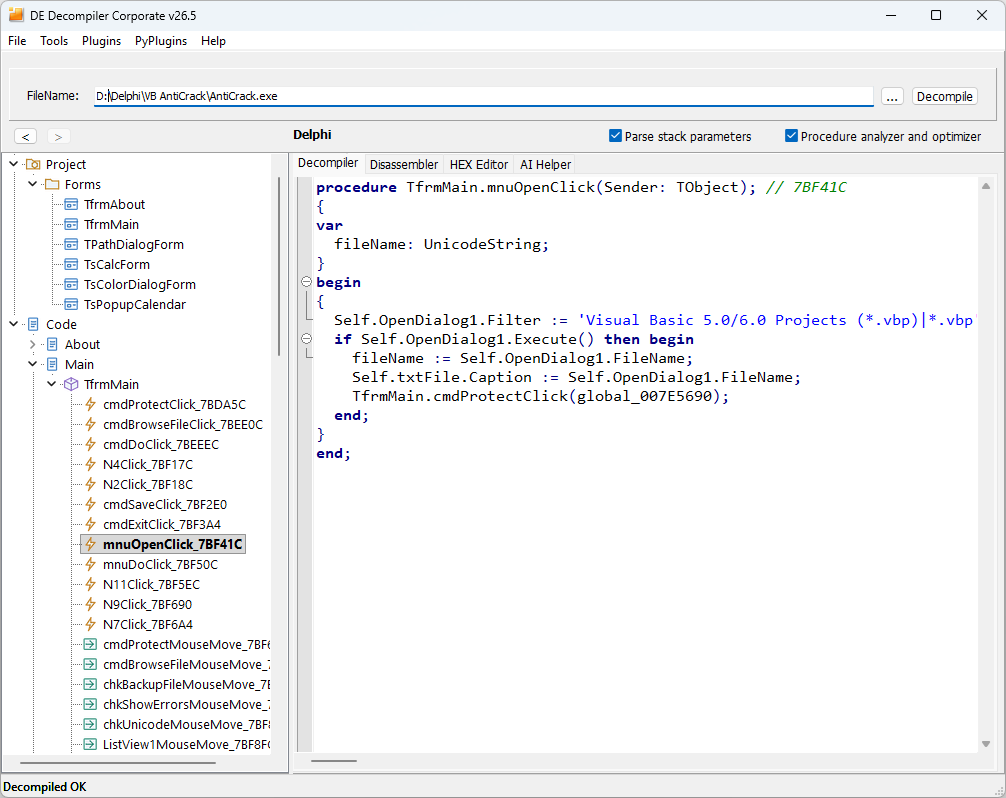
Understand native code and application structure
Follow application logic from recognized units and classes to individual functions. DE Decompiler combines native instructions with compiler metadata and version-specific RTTI knowledge.
Delphi-like Pascal from native code
Reconstruct conditions, case statements, loops, expressions and recognized VCL calls. Compare the result with Win32/Win64 disassembly and HEX bytes to investigate code that needs closer review.
Units, classes and functions
Browse recovered unit and class declarations, public functions and private functions discovered heuristically within units. Use the project structure to locate relevant implementation code.
Delphi 3–13 and C++Builder
Analyze Win32 and Win64 VCL applications from both compiler families. C++Builder output is also Delphi-like Pascal, with PAS/DFM export; its code quality is lower because RTTI knowledge bases for C++Builder-specific libraries are not yet available. The other tools remain available under the same edition rules.
Security and forensic investigations
Inspect application logic, string references and native instructions to investigate malware, potentially unwanted behavior or concealed functionality without running the analyzed application.
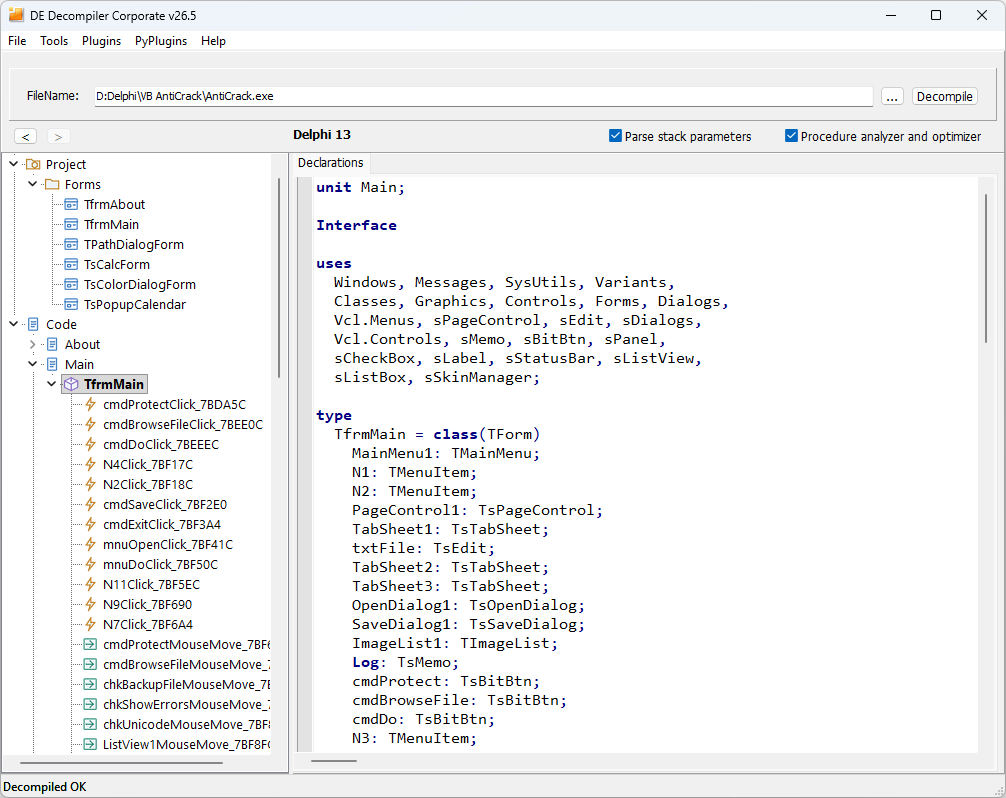
Connect VCL forms with their implementation
Inspect the recovered interface, identify relevant controls and follow their event handlers into code. Keep code and form information together throughout the investigation.
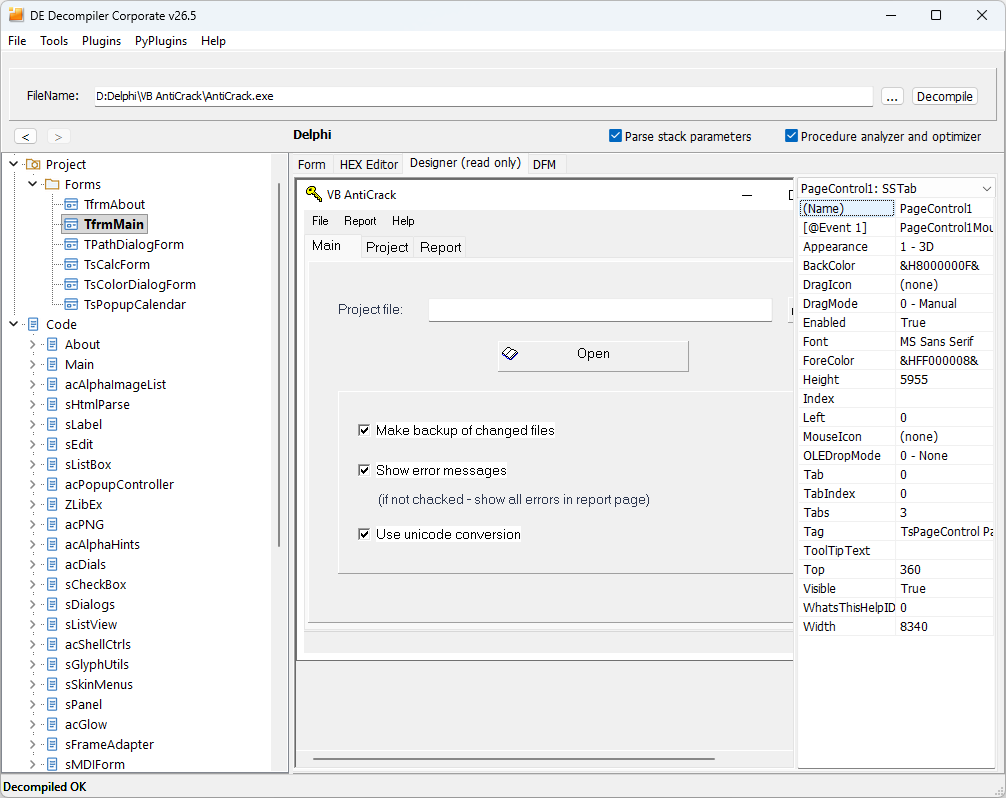
VCL form visualization
View recovered forms, controls, properties, menus and available DFM data in the read-only designer. Use the interface to understand the context of an application feature.
Event-handler navigation
Navigate from recovered events in the form visualization to the corresponding handlers. Follow the implementation of buttons, menus and other controls.
Search and string references
Find procedures and references to strings, then inspect the associated code and native instructions. String References are also available in Free Lite.
PAS/DFM and analysis databases
Export recovered units and forms as a Delphi project or save a combined PAS listing. Save a VDD analysis database to retain the analysis for subsequent review.
Extend the analysis workflow
Use AI-assisted refinement, plugins and binary editing alongside the decompiler. Commercial licenses provide the same analysis features for individual developers and enterprise teams.
AI Helper
Refine selected decompiled code through local models served by Ollama or online services with an OpenAI-compatible API, including ChatGPT and DeepSeek. Review generated changes against the binary evidence.
Plugin SDK
Develop plugins for a specific investigation or processing task with the SDK shared by DE Decompiler and VB Decompiler. The SDK exposes analysis data and supports product identification.
FRX Image Viewer
Preview and save recovered form graphics and recognized ImageList icons. The plugin works with DE Decompiler as well as VB Decompiler.
Win32/Win64 obfuscation and binary tools
Use the integrated obfuscator for supported Win32 and Win64 applications. Inspect native instructions and file bytes when verifying the output or examining a binary modification.
Evaluate the product with your own files
Download the trial, test the workflow that matters to you, and choose the license that includes the capabilities you need.
Product resources
Frequently Asked Questions
What is DE Decompiler?
DE Decompiler is a professional tool for analyzing and decompiling native Win32 and Win64 VCL applications written in Delphi 3–13 or built with C++Builder. It is intended for reverse engineers, forensic investigators, malware analysts, corporate security teams and developers.
What can be recovered?
DE Decompiler reconstructs Delphi-like Pascal, VCL forms and DFM data, units, classes and functions from native instructions and available metadata. It recognizes high-level control flow and supported VCL calls and links recovered form events to their code.
How does C++Builder support differ?
Forms, units, classes, functions and the other supported tools are available under the same edition rules. Code is reconstructed as Delphi-like Pascal and exported as PAS/DFM. Without RTTI knowledge bases for C++Builder-specific libraries, names and types are less completely recognized and code quality is noticeably lower than for Delphi.
Can recovered code be opened directly in an IDE?
Manually review and correct decompilation inaccuracies and incompatibilities first. Native binaries do not preserve the original source text, local variable names or complete type layouts.
What is available in Free Lite?
Free Lite provides form inspection, native disassembly and String References. High-level code decompilation requires a Single Developer or Enterprise license.
How do Single Developer and Enterprise licenses differ?
Single Developer is assigned to one named developer on one PC or locally hosted virtual PC. It cannot be shared or reassigned between developers. Enterprise covers up to 20 users and 20 PCs or locally hosted virtual PCs within one organization. Both provide the same product features and include one year of updates and technical support.